HERO by Runhydro Engineers
Hydropower Learning • O&M Management • Events • Knowledge
One digital platform for hydropower training, technical knowledge, events and complete plant O&M management. Built for operators, engineers, maintenance teams, plant managers and owners.
Plant Operations
Maintenance
Protection & Automation
Workforce Competency
Practical courses, structured learning paths, assessments and certification for hydro professionals.
Daily logbooks, shift handover, generation records, operating procedures and plant status.
Work orders, preventive maintenance, inspections, assets, spares, tools and equipment history.
Knowledge, analytics, expert sessions, lessons learned and competency tracking for continuous improvement.
Courses, role-based learning paths, certification, technical resources and live training designed around real plant work.
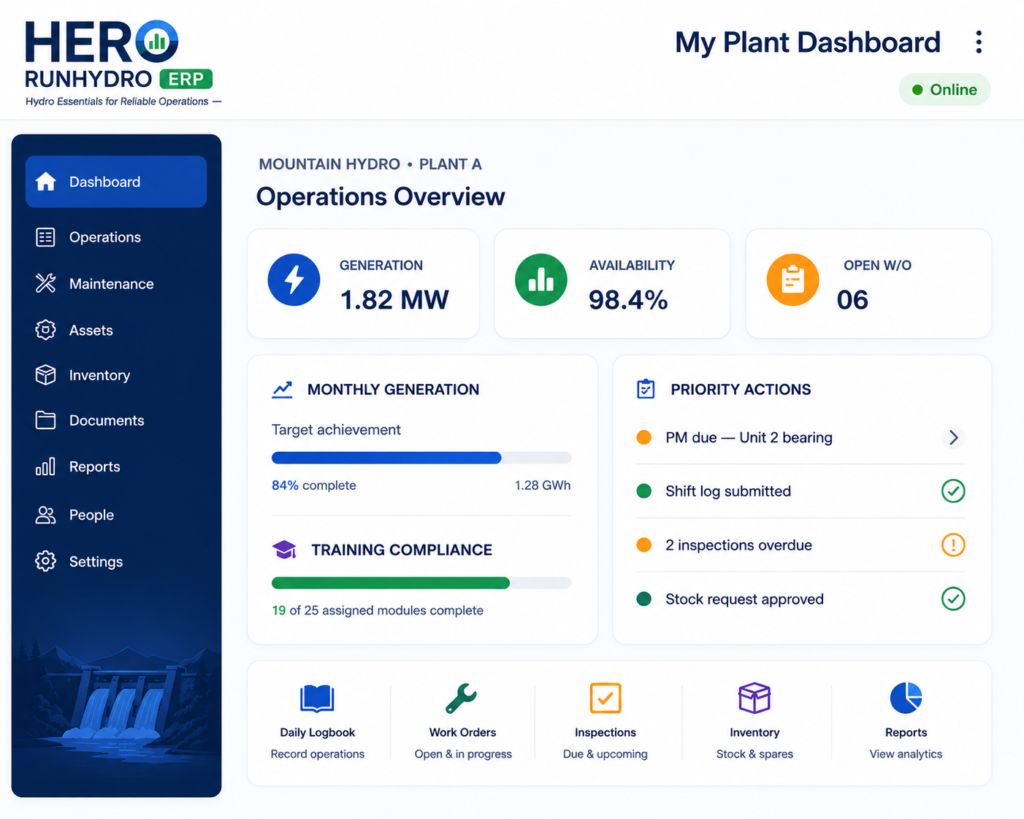
Operations, maintenance, assets, inventory, staff, documents, inspections, analytics and plant records—connected in one ERP.
Water-to-wire, plant systems, turbines, generators and hydrology basics.
Startup, shutdown, synchronization, shift operation and abnormal conditions.
Generators, transformers, switchgear, relays, CT/PT, DC systems and metering.
Pelton, Francis, Crossflow, bearings, alignment, lubrication and valves.
PLC, HMI, SCADA, governor systems, excitation and instrumentation.
PM, CM, inspections, RCA, condition monitoring and maintenance planning.
Electrical safety, LOTO, fire safety, safe maintenance and emergency response.
Synchronization, PF, reactive power, frequency, voltage and grid compliance.
Operations, synchronization, logbooks, SOPs, safety and abnormalities.
Generator, transformer, protection, switchgear, AVR and testing.
Turbines, bearings, alignment, lubrication, valves and maintenance.
PLC, HMI, SCADA, governor, AVR, communications and troubleshooting.
Performance, maintenance planning, workforce, inventory and reporting.
A hydropower-specific ERP and CMMS built around the real O&M workflow of power plants—not a generic business system.
Strict multi-plant data separation
Operator, engineer, manager & admin access
Generation records, shift logs, handovers, unit status, operating events and daily plant history.
Preventive and corrective work, schedules, job history, breakdowns and maintenance planning.
Plant equipment hierarchy, specifications, history, documents and maintenance linkage.
Stock control, issue/return, requests, critical spares and plant-specific inventory.
Checkout/return, assigned custody, condition, calibration, inspection and certification history.
Routine inspections, readings, defects, trends, condition findings and follow-up actions.
Revision control, approvals, effective versions, drawings, settings, backups and technical records.
Generation, availability, downtime, maintenance KPI, outstanding tasks and management reports.
Course completion should not end with a certificate. HERO can connect staff training to their plant role, equipment, SOPs and authorization status.
Shift Operator
7 core modules
Synchronization ✓
Updated automatically
Unit Startup Rev.04
Qualified staff visible
Technical Session • 90 min • Online
Hands-on Training • Kathmandu / Plant Site
Plant Managers • O&M Engineers
How to structure a practical investigation across AVR, controller settings, CT polarity, reactive control and plant conditions.
A structured checklist for voltage, frequency, phase sequence and controller permissives.
Understand the difference and where each operating mode matters in hydro plants.
Build a practical routine around temperature, vibration, bearings, excitation and electrical checks.
Plain-language explanations for operators, technicians and new engineers.
O&M systems, performance, reporting, workforce and reliability.
Generators, relays, transformers, synchronization and switchgear.
Turbines, governors, bearings, alignment, hydraulics and maintenance.
PLC, HMI, SCADA, governor control, excitation and communication.
Bring plant operations, maintenance, documentation and workforce learning together under one company and plant-specific portal.
Open the browser menu and select Install app or Add to Home Screen.